VINCUE TheRundown
Hero
The Rundown · Friday, July 24, 2026

Everything In Sync.

What shipped this cycle - two-way Tekion sync, cross-store transfer visibility, a recon workflow that never drops a vehicle, one inspection that feeds CarMax, and a run of Buy Center Pro updates across Benjamin, Service Lane, and Bare Metal, plus a mobile assist for text inspections.

9 Web Updates 1 Mobile Update 10 Bug Fixes

One note: AppraisalPro appears in this cycle's written release notes, but it isn't live yet - so it's not part of today's walkthrough. We'll cover it on a future Rundown once it ships.

Scroll
Heads Up · From Product

Where Product Stands.

A quick word from Jon Beachner before we get into the release. The focus right now: finishing what we start before taking on the next thing. Feature work averages about 35 days start to finish, and being more deliberate is how that number comes down.

Finish What We Started

In Flight

VINCUE AI, Buy Center Pro (Bare Metal & Ditra), Tekion, ACE, Mobile Recon, AHX, Spyne Studio, Tractable, DealNow, MyKaarma.

Up Next

Queued

VINCUE API Storefront, Plug EV, Reynolds RCI. Custom Reports remains the ongoing request.

Dealer Requests

Bergstrom & West Herr

12 requests in, mostly West Herr, three in progress. Most targeted for the next release; high-priority items hotfixed where possible.

What's Moving
VINCUE AI In Testing

First Dealers Soon

Core is complete and in testing. First dealers targeted for late July or early August.

Tekion This Release

Write-Backs Go Live

Media, color, status, pricing, and odometer write-backs ship this release. Trade Push work starts mid-August.

Mobile Recon ~64%

Two Sprints Out

About 64% complete, targeting the finish line over the next two sprints.

Tractable Resuming

Back On

Unblocked now that Tractable wrapped phase one. Picking it back up.

Last Sprint, By the Numbers
13
Items delivered (4 new features & enhancements)
6
Issues or bugs
3
Reporting requests
Cycle Time · Start to Production
5 days support · 35 days feature work · 99 days epic

Also in discovery: API Storefront, Reynolds RCI, Montway Auto Transport, RouteOne. Delivery numbers refresh every two weeks on the sprint cadence.

01
Section 01 · Tekion Integration

Two-Way Tekion Sync.

Inventory data now flows both directions, faster and more completely. VINCUE writes photos, colors, and key fields back to Tekion, imports every Tekion status, and picks up Tekion changes the moment they happen.

01.A · Tekion · Inventory Sync

Write-Backs Go Live This Release.

Photos and paint colors now update in Tekion the moment they change in VINCUE, every Tekion inventory status is available for import, and price, mileage, and other key-field changes flow back into VINCUE in real time.

  • Push updated vehicle photos straight to Tekion
  • Push interior and exterior color updates automatically
  • All Tekion inventory statuses available for import
  • Instant updates in VINCUE when price, mileage, or key fields change in Tekion
Shipping this release Write-backs: media, interior/exterior color, statuses, pricing, and odometer.

Status import now covers In Transit, On Order, In Service, Pending Sale, Wholesale, and every other status Tekion defines. No setup for dealers already on the integration; it just flows.

No walkthrough this round - the Tekion side isn't available for us to record. The write-backs are dealer-invisible anyway; they happen automatically.

02
Section 02 · Inventory

Know Every Transfer.

Dealer groups can now stay on top of vehicle transfers across their stores. When one store trades a vehicle to another in the same group, selected users are notified automatically instead of tracking transfers by hand.

02.A · Inventory · Transfers

Group-Wide Transfer Visibility.

Selected users get notified the moment a vehicle moves between stores in their group, and every notification now carries the full detail of the transfer.

  • Notified automatically on any transfer between stores in the group
  • See the date, time, and both stores involved
  • Notification includes YMMT, Stock #, VIN, Odometer, Online + Transfer Price, Internal Notes, and both locations
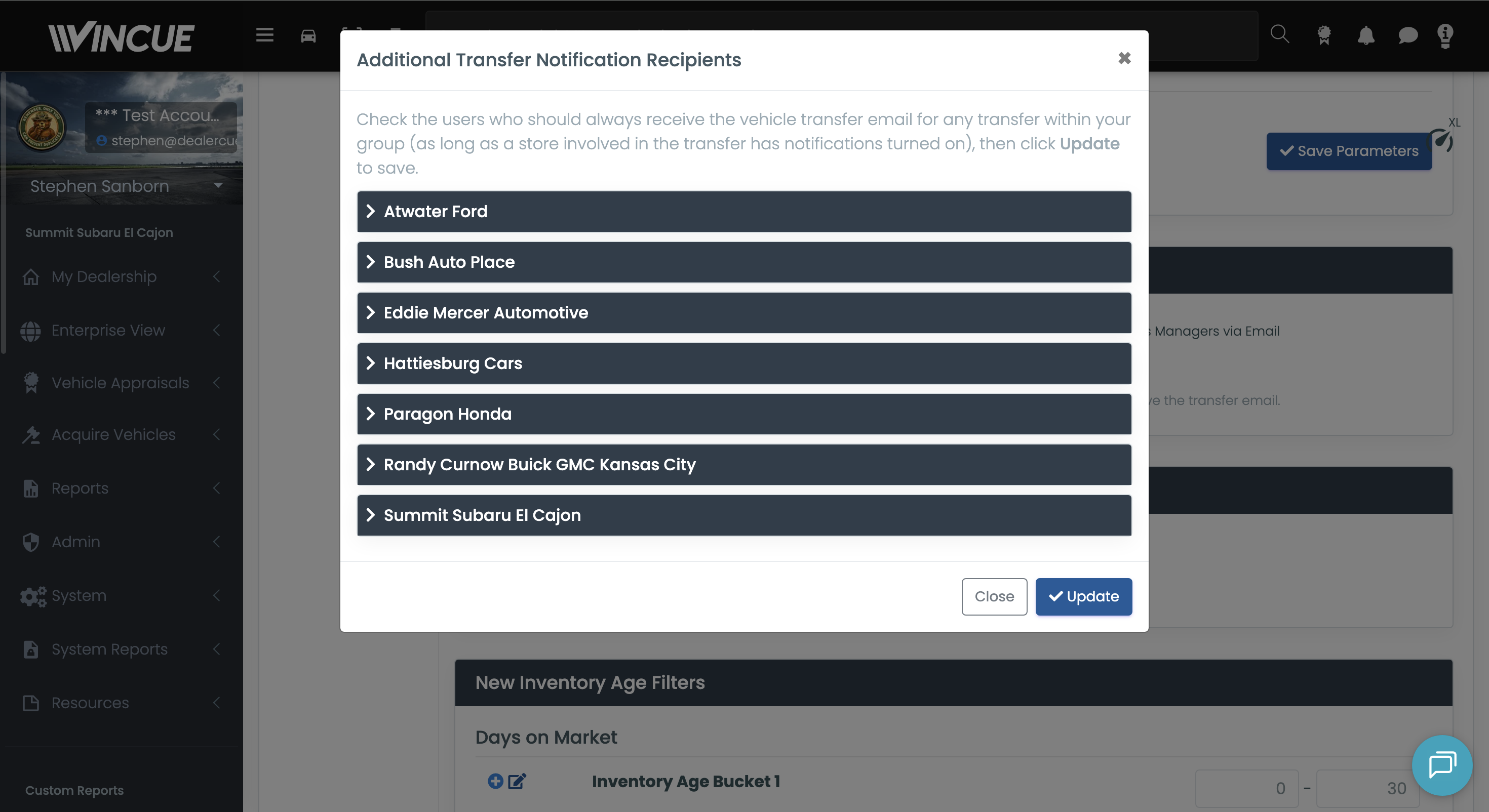
Setup Dealer Settings → Inventory → Inventory Transfer Notification. Notify of Vehicle Transfer must be enabled, then use Select additional recipients to choose users per store. Existing single-location notifications are unchanged; this adds full group-wide visibility for the selected users.
VIDEO Inventory Transfer Notification settings with recipient selection
03
Section 03 · Recon Workflow

No Vehicle Left Behind.

Recon Workflow now makes sure every vehicle always has an active stage, so units can't fall through the cracks between steps. When a vehicle finishes its only active stage, the next one in line becomes active automatically.

03.A · Recon Workflow

Always an Active Stage.

Vehicles with an active-but-not-yet-started stage now count in the On Track bucket, and a new Not Started grid filter lets managers see the full queue. It runs automatically in the background.

  • Every vehicle in the workflow is always sitting in an active stage
  • Active-but-not-started vehicles roll into the On Track bucket
  • New Not Started filter surfaces the full queue in the recon grid
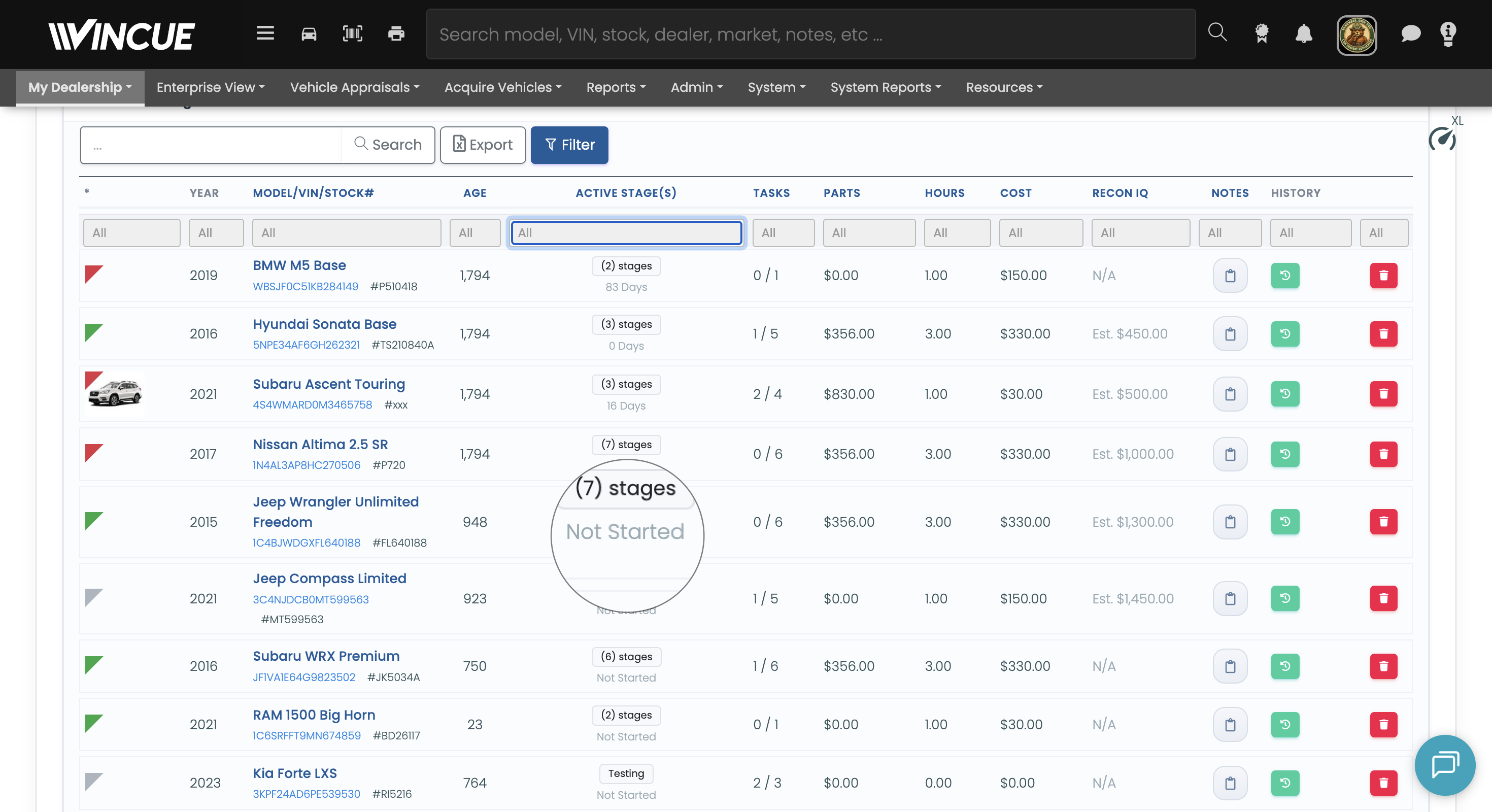
VIDEO Recon Workflow grid with the Not Started filter
04
Section 04 · Inspection

One Inspection, MaxOffer-Ready.

The inspection report now covers everything CarMax's MaxOffer integration needs, so dealers use a single report as the source of truth instead of filling out a separate CarMax form.

04.A · Inspection · MaxOffer

One Report Feeds CarMax.

New line items have been added under the existing inspection sections to match CarMax's requirements. Anything MaxOffer requires now auto-populates in its questionnaire for review before submitting the vehicle to CarMax.

  • One inspection report covers all MaxOffer requirements
  • New line items under Mechanical, Exterior, Interior, and Other
  • Required items auto-populate in the MaxOffer questionnaire
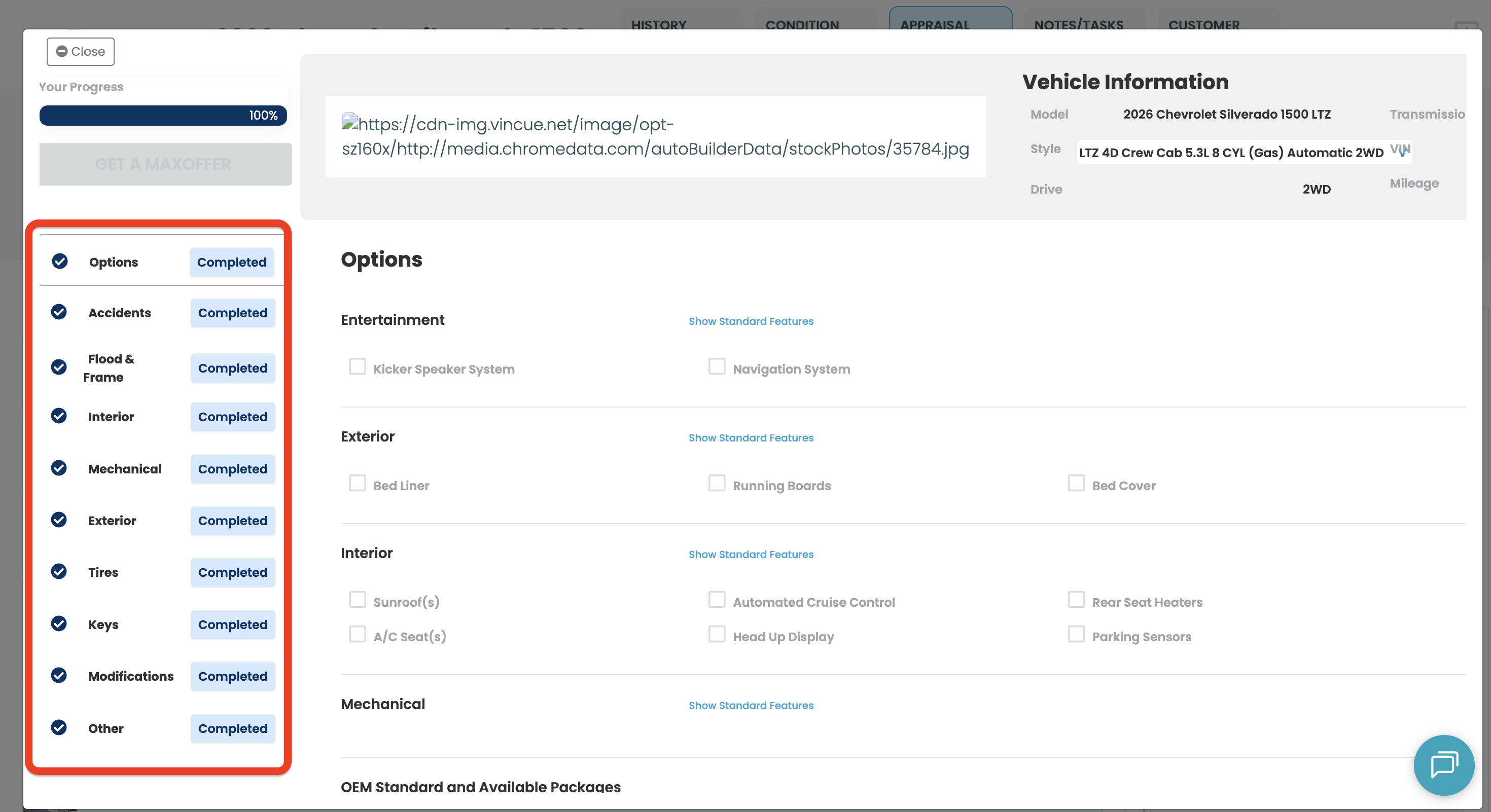
Worth flagging If any of the new line items are left unselected in the inspection report, they show on the MaxOffer questionnaire as 'Complete.'
VIDEO Inspection report line items feeding the MaxOffer questionnaire
05
Section 05 · Benjamin

Smarter Service-to-Sales Outreach.

Benjamin's automated outreach is more configurable and more considerate of the customer. Dealers control the purchase-date window, more dealers get next-day appraisals, and Benjamin won't re-message someone it just reached.

05.A · Benjamin · Outreach

Configurable, Considerate Outreach.

Set your own minimum purchase date for auto-Benjamin, appraise all of tomorrow's appointments even off the next-day program, and trust that Benjamin holds off on customers it engaged in the last few days.

  • Set a minimum purchase date for auto-Benjamin in dealer settings (e.g. 12 months back)
  • Auto-appraise all of tomorrow's appointments, even for dealers not on the next-day program
  • No repeat outreach to a customer already engaged within the last few days
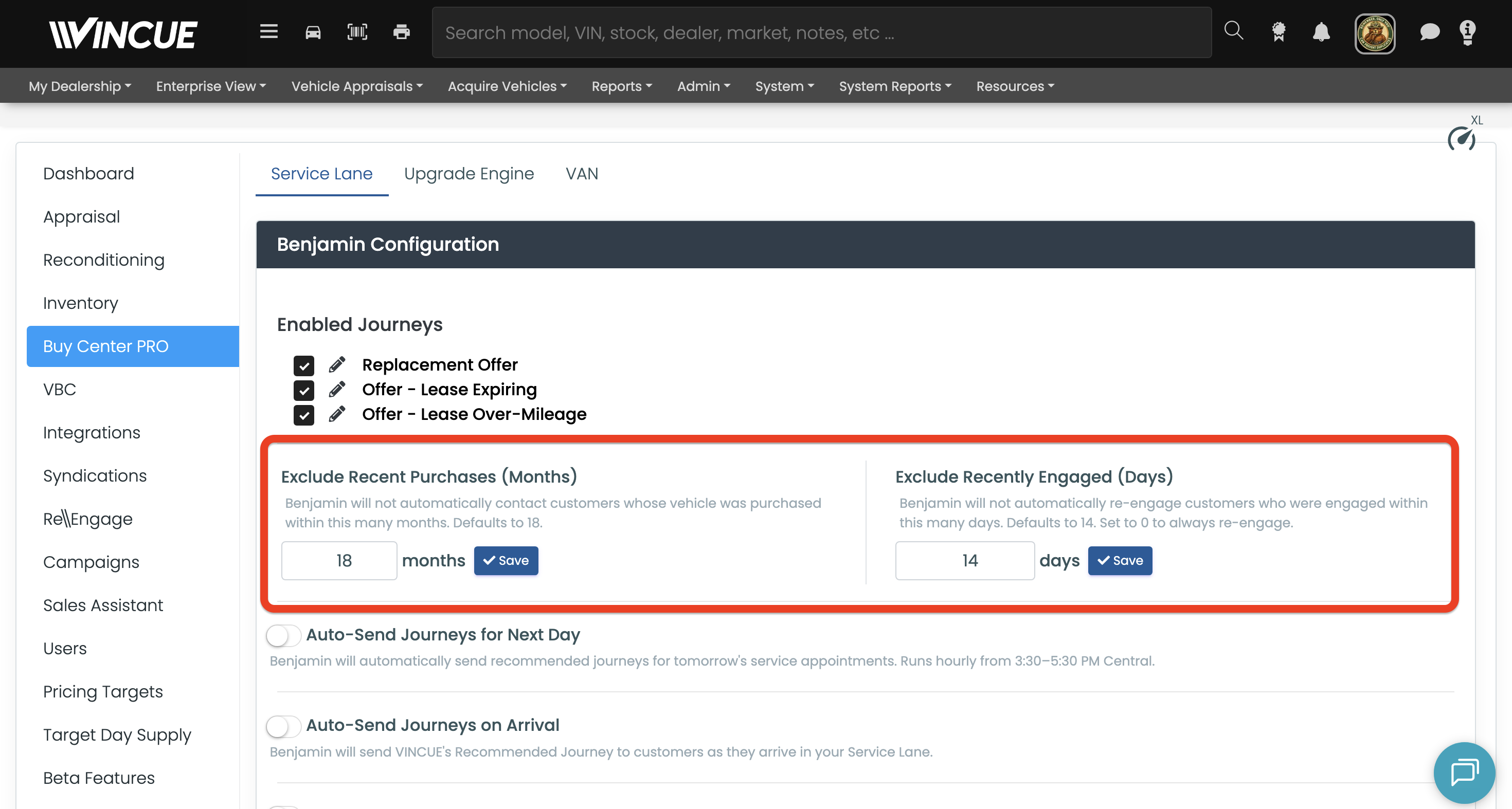
VIDEO Benjamin outreach settings with minimum purchase date
06
Section 06 · Buy Center Pro · Service Lane

Service Lane, Sharper.

Two Buy Center Pro updates: the customer's deal right inside the appointment, and appointment assignment everyone can see.

06.A · Service Lane · Deal Visibility

The Deal, Right in the Appointment.

Appointments now surface the customer's active deal inline from the Customer Information modal, so sales and service don't jump between screens. Powered by a Ditra integration that's configurable per environment.

  • Active deal shown inline in the appointment detail view
  • Lease equity calculations now include the residual
  • ACE offer fields populate in both Spyne and Ditra journeys
  • PMR available as an ACV default source
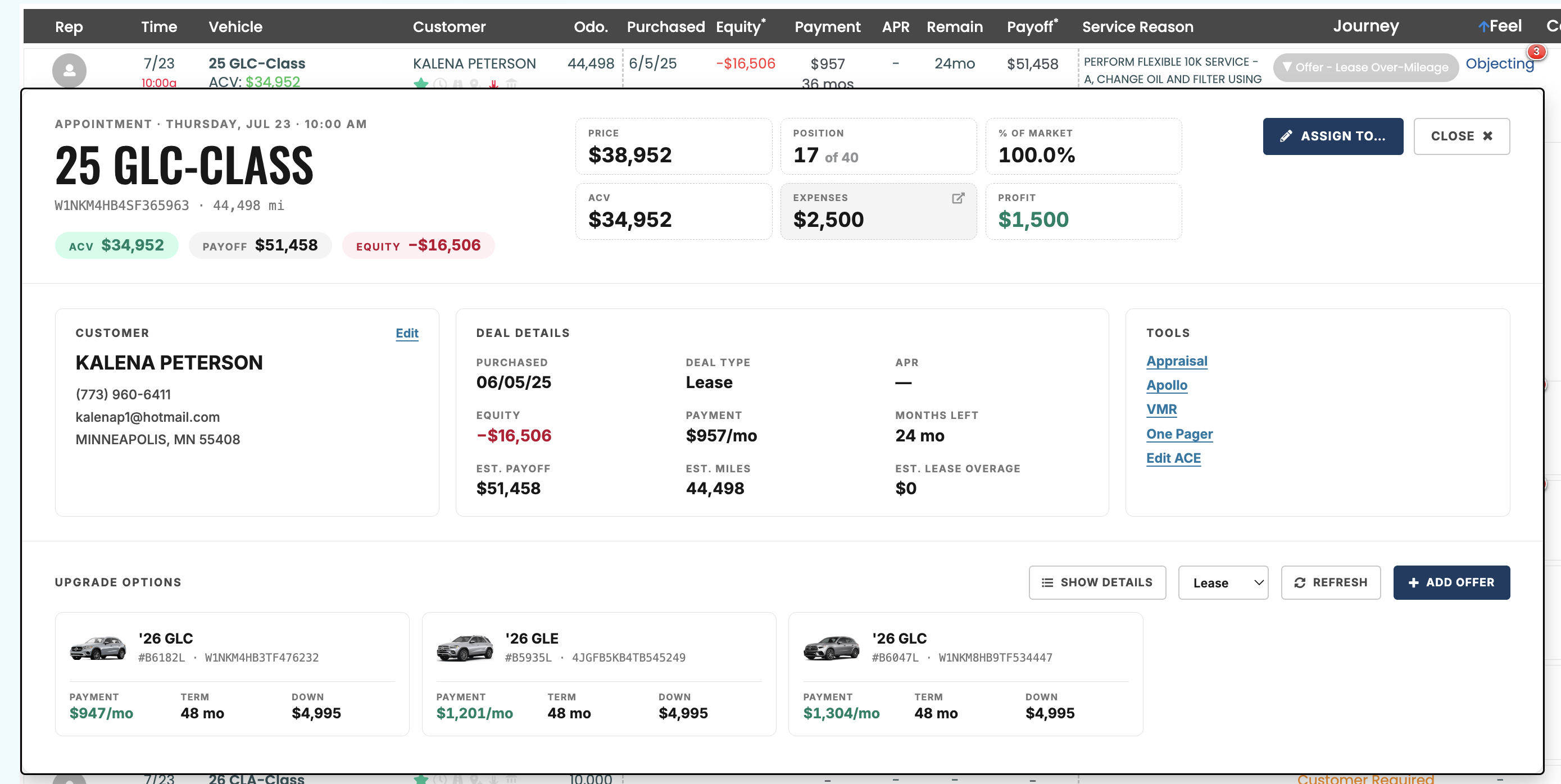
VIDEO Appointment detail showing the customer's active deal inline
06.B · Service Lane · Assignment & Claiming

Everyone Sees Who Owns It.

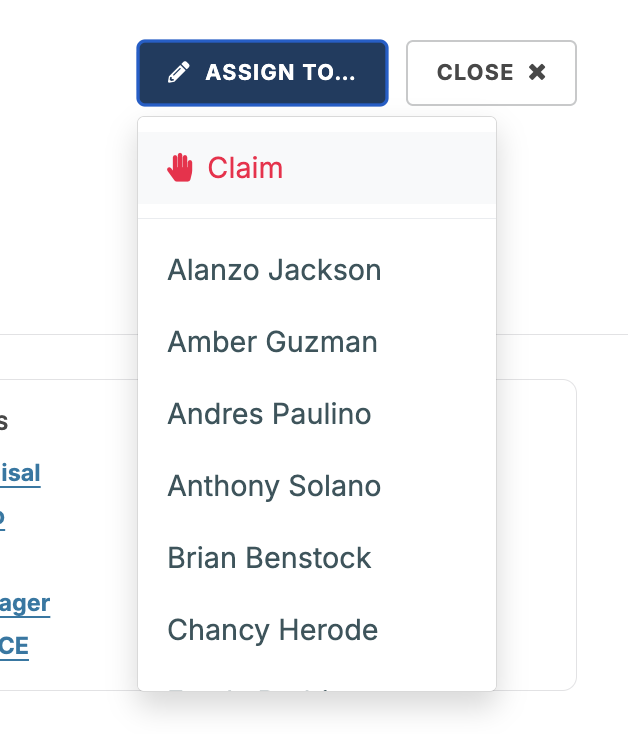
Salespeople can claim an appointment themselves, appointments can auto-assign to whoever scans the vehicle in, and the assignee gets notified the moment it lands.

  • Claim a service appointment for yourself
  • Auto-assign to whoever scans the vehicle in
  • Sort and filter by assigned salesperson, or filter to Mine Only
  • Notified the moment you're assigned
VIDEO Service Lane appointment assignment and claiming
07
Section 07 · Buy Center Pro · Bare Metal Accounts

Bare Metal Upgrades, Built Out.

Two updates for Bare Metal accounts. Bare Metal is the lead source, not a screen of its own - these land in the Buy Center Pro desktop UI. No demo videos this round; here's what changed.

07.A · Bare Metal Upgrade Offers

Editable Offers, Full Breakdown

Taxes & fees in the payment, a Show Details deal-sheet breakdown, dealer margin %, local-time Tekion appointments, and amortization-based payoff.

07.B · Bare Metal DealerTrack

DealerTrack Appointments Flow In

DealerTrack service appointments now flow into Service Lane automatically, the same way other integrated DMS appointments do. No setup needed.

08
Section 08 · Mobile · Sales Assistant

Self-Inspection, One Tap Away.

Sending a self-inspection link is faster and more visible across the app, and Sales Assistant users can share appraisals and track requests without leaving the appraisal screen.

08.A · Mobile · Sales Assistant

Text a Link, Track the Request.

Text a self-inspection link to a customer right from the New Appraisal button or the Sales Assistant appraisal screen's app bar, and see pending requests as their own card instead of hidden while waiting on a response.

  • Text a self-inspection link from the New Appraisal button or the appraisal app bar
  • Give Sales Assistant users permission to send text inspections
  • Share appraisals with other users as a Sales Assistant
  • Pending self-inspections appear as their own card on the dashboard
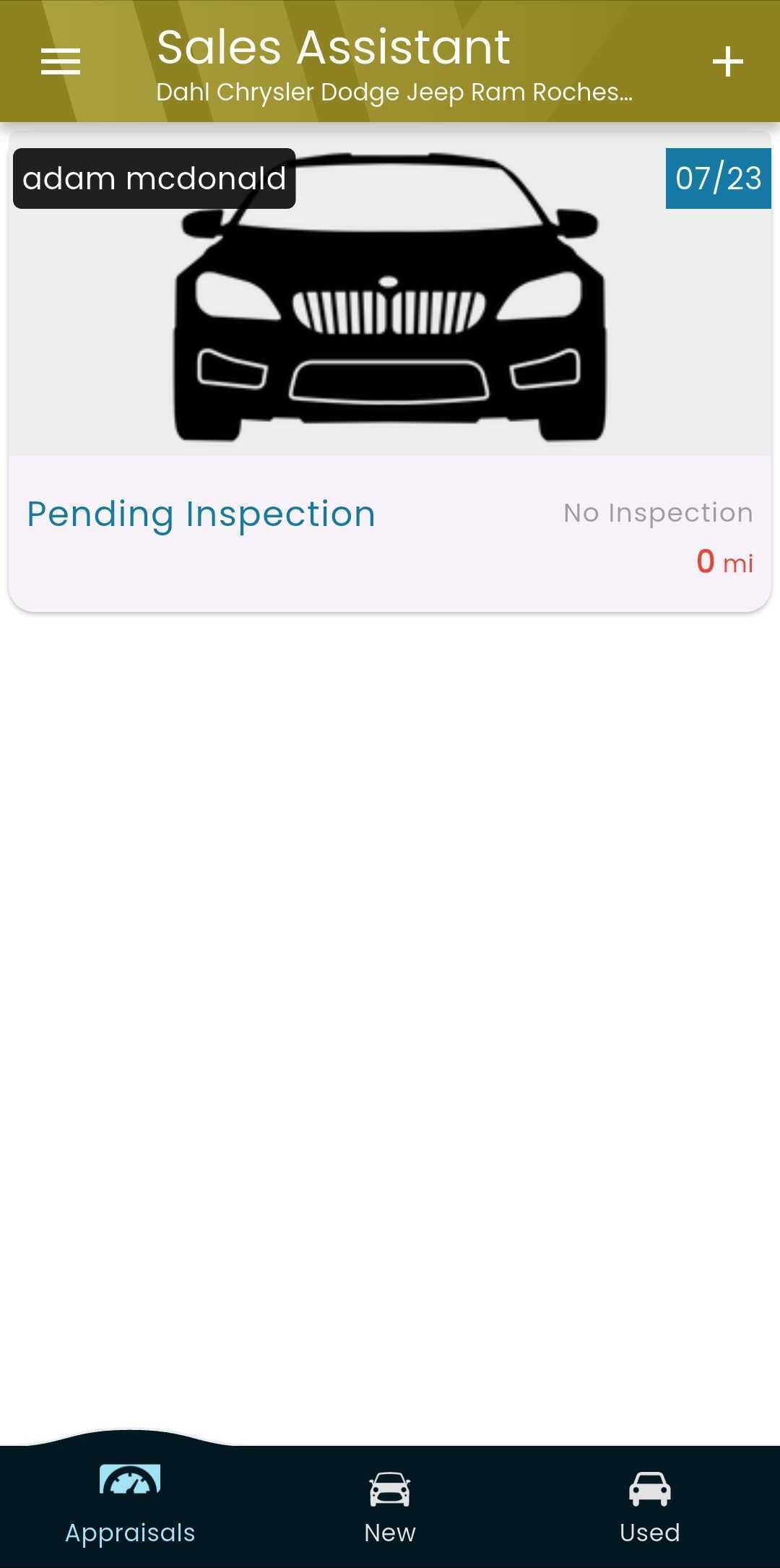
VIDEO Text inspection icon and pending self-inspection card in Sales Assistant
09
Section 09 · Bug Fixes

The Quiet Wins.

Ten fixes this cycle - offers and deals, Benjamin and imports, plus search, photos, and more. Click any fix for the detail.

Offers & Deals

  • Bare Metal upgrade offers now show the correct down payment, VIN, and stock number.
  • Upgrade offers now request standard lease and finance terms.
  • TeamVelocity dealers see a relabeled 'Adjusted Selling Price.'
  • High APR alerts now use the correct rate.

Benjamin & Imports

  • Benjamin now re-engages Spyne dealers' customers with a prior conversation.
  • DealerVault importer now captures all deal statuses and more DealerTrack deal types.
  • Recon Defaults relabeled for clarity.

Search, Photos & Mobile

  • Appraisal Search runs on a faster, more reliable backend.
  • Bulk photo deletes no longer have a 10-minute cooldown.
  • Auction Run List now shows the Edge Pipeline source on mobile.
Wrap · Next Steps

That's a Rundown Wrap.

  • All features above are live now for accounts on this release.
  • Tekion write-backs (media, color, status, pricing, odometer) flow automatically for dealers already on the Tekion integration - no setup.
  • Inventory Transfer Notifications: turn on "Notify of Vehicle Transfer" and pick recipients per store in Dealer Settings → Inventory.
  • Inspection line items left unselected show as 'Complete' on the MaxOffer questionnaire - worth flagging with dealers using CarMax.
  • Office hours: Tuesday, 2pm Central - bring the dealer questions you've been sitting on.
VINCUE · The Rundown · July 24, 2026